Dev-C++
Introduction
Dev-C++ is a free Integrated Development Environment (IDE) for developing C/C++ programs, distributed under the GPL license. It uses MinGW and GDB as its compilation and debugging systems. Dev-C++ runs on Microsoft Windows.
The advantages of Dev-C++ lie in its clean and friendly interface, easy installation, and support for single-file compilation, making it the first choice for many beginners in OI and C++ language learners. In NOIP, provinces that provide Windows as the competition system generally pre-install Dev-C++.
Dev-C++ originated from Bloodshed Dev-C++ written by Colin Laplace. This version stopped updating on February 22, 2005. In 2006, the main developer of Dev-C++, Colin Laplace, once explained: "Due to being busy with real-life affairs, there is no time to continue the development of Dev-C++."
Orwell Dev-C++ is a derivative version of Dev-C++, developed and maintained by independent programmer Orwell (Johan Mes). It fixed bugs from the original Dev-C++ and updated the compiler version. Generally, Dev-C++ 5.x versions are Orwell Dev-C++. Its last update was in 2015, version 5.11.
Embarcadero Dev-C++1 is the successor to Bloodshed Dev-C++ and Orwell Dev-C++. In 2020, Embarcadero sponsored and took over the original Dev-C++ project, continuing its development. Embarcadero Dev-C++ added support for high DPI, updated the compiler to include support for newer C++ standards, and added a dark mode.
The above Dev-C++ distributions are considered "official." Additionally, after Orwell Dev-C++ stopped updating in 2015, due to teaching needs, a Chinese individual developer royqh1979 decided to continue developing his personal fork of Dev-C++, named Little Panda Dev-C++2, integrating intelligent prompts and high-version MinGW64, which is very convenient for personal use and learning in China.
After the release of Little Panda Dev-C++ version 6.7.5, the author used qt5 to develop a brand new Little Panda C++3, which can run natively on systems such as Windows, Linux, and macOS. The interface of Little Panda C++ is similar to Dev-C++. Besides providing similar but more complete single-file compilation, debugging, syntax highlighting, search/replace, and other functions like Dev-C++, it also offers basic features common in modern IDEs such as dark theme, code intelligent prompts, variable/function renaming, switching/auto-detecting file encoding. Furthermore, Little Panda C++ also has a problem set function similar to CP Editor, allowing users to write their own or download sample problems from common OJ competition websites, and automatically run and test programs.
Usage Tutorial
Common Shortcuts
File Operations
Ctrl + N: Create source codeCtrl + O: Open fileCtrl + W: Close fileCtrl + Shift + W: Close all filesCtrl + P: Print file
Formatting
Ctrl + /: Comment/UncommentTab: IndentShift + Tab: Unindent
Line Operations
Ctrl + E: Duplicate lineCtrl + D: Delete lineCtrl + Shift + Up: Move line upCtrl + Shift + Down: Move line down
Navigation
Ctrl + F: SearchCtrl + R: ReplaceF3: Search nextShift + F3: Search previousCtrl + G: Go to line numberShift + Ctrl + G: Go to functionCtrl + [1 ~ 9]: Set bookmarkAlt + [1 ~ 9]: Jump to bookmark
Display
Ctrl + Mouse Wheel: Zoom font size in/outCtrl + F11: Toggle fullscreen
Running
F9: Compile onlyF10: Run onlyF11: Compile and runF12: Rebuild all
Debugging
F2: Go to breakpointF4: Toggle breakpointF5: Debug runF6: StopF7: Step into
Debugging Process
- Set the compiler configuration to
TDM-GCC 4.9.2 64-bit Debug - Press
F4to set or remove a debug breakpoint - Place the cursor on a variable, press
Alt + Ato add a watch variable to the debug window - Press
F5to start debugging - Press
F7orAlt + Nto step through debugging - Press
Alt + Sto jump to the next debug breakpoint - Press
F6to stop debugging
Extensions
Adding Compilation Options
Click Tools -> Compiler Options, then select the "Settings" -> "Compiler" tab. The following introduces several commonly used compilation options by the author.
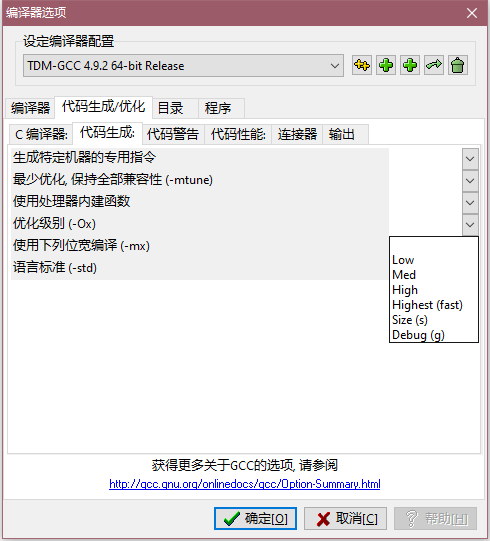
Enable Optimization
Optimize code runtime or memory usage.
Select the "Optimization level (-Ox)" option label under the "Code Generation" sub-tab.
Change Language Standard
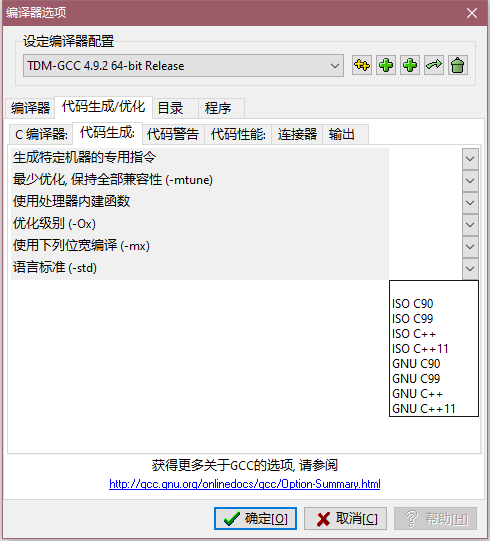
Use new language features or attempt to compile code under an older standard.
Select the "Language standard (-std)" option label under the "Code Generation" sub-tab.
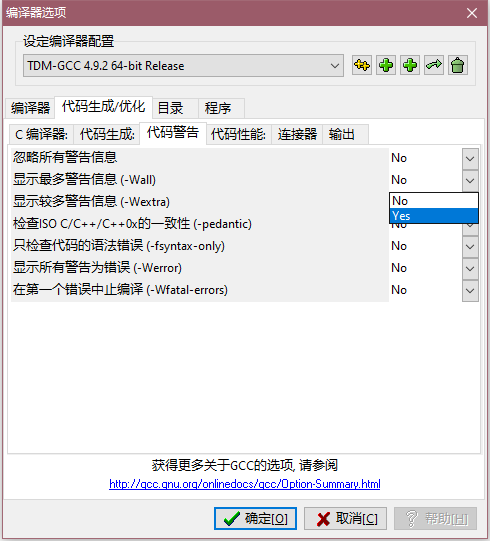
Show Maximum Warnings
A small helper for error checking.
Select the "Show maximum warnings (-Wall)" option label under the "Warnings" sub-tab.
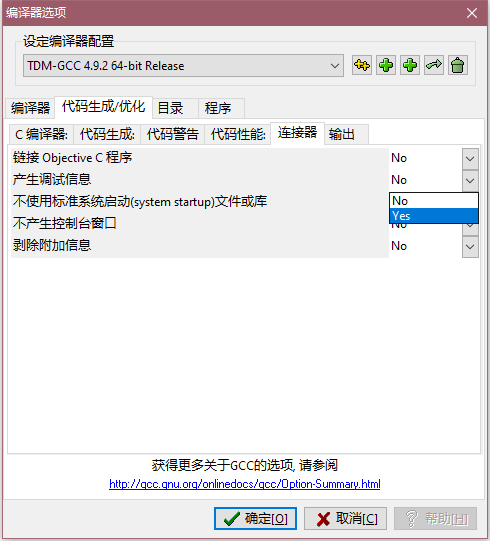
Generate Debug Information
Needed when the message "Project has no debugging information, do you want to open project debugging options and rebuild?" appears and clicking causes a crash, or when you want to use debugging features.
Select the "Generate debugging information" option label under the "Linker" sub-tab.
Compilation Tricks
Click Tools -> Compiler Options, then select the "Compiler" tab. The following introduces several common tricks.
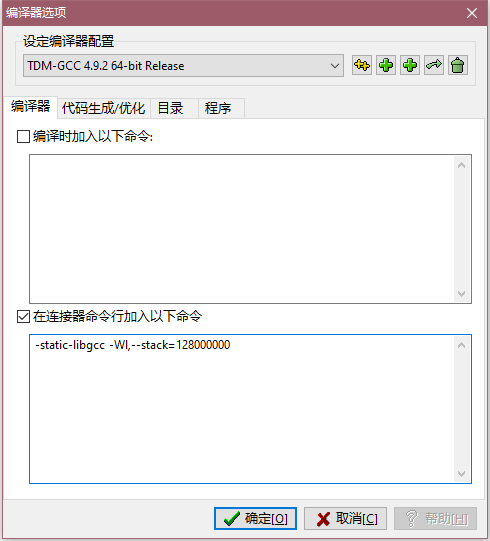
Increase Stack Size
Prevent situations like DFS causing a system stack overflow.
Add the command -Wl,--stack=128000000 to "Add the following commands when calling the linker".
This command sets the stack size to approximately 128MB. You can increase it as needed.
Define Macros
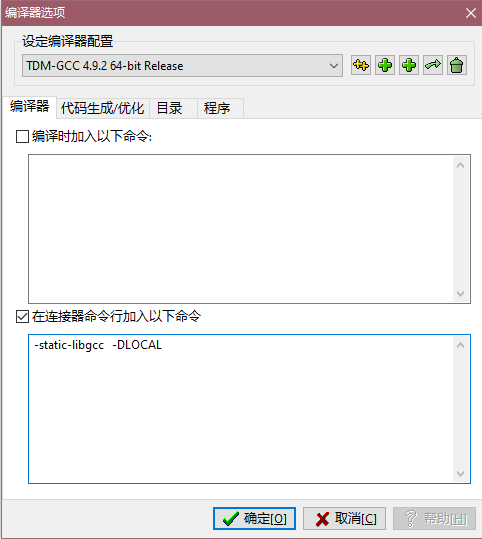
Convenient for local evaluation using file input/output or other purposes.
Add the command -D[String] to "Add the following commands when calling the linker".
Replace [String] with your desired macro name.
As shown in the figure, after enabling this compilation option, the following code can read data from the test.in file and output to the test.out file.
1 2 3 4 | |
Code Formatting
Click Astyle -> Format Current File or press Ctrl+Shift+A to format the code.

Beautification
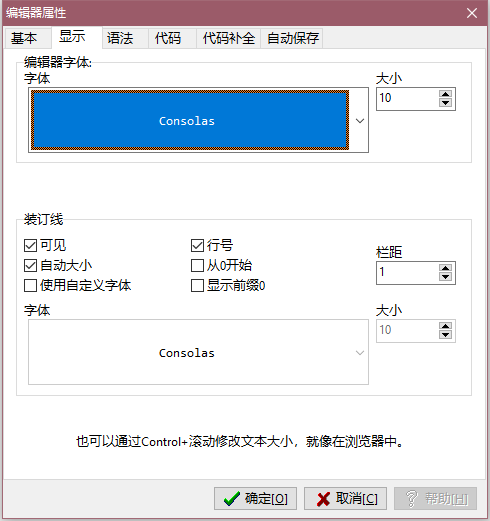
Font
Click Tools -> Editor Options, then select the "Display" tab.
Theme
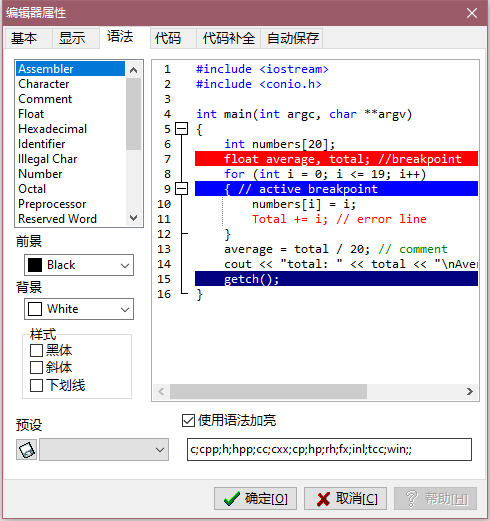
Click Tools -> Editor Options, then select the "Syntax" tab. You can use preset themes or adjust them yourself.
References
-
Project source code is hosted on GitHub and SourceForge. ↩
-
Project official website is at Little Panda C++, source code is hosted on Github ↩
本页面最近更新:,更新历史
发现错误?想一起完善? 在 GitHub 上编辑此页!
本页面贡献者:OI-wiki
本页面的全部内容在 CC BY-SA 4.0 和 SATA 协议之条款下提供,附加条款亦可能应用