Formatting Guide
Before you begin, the entire OI Wiki project team warmly welcomes you to contribute pages to this project. It is thanks to hundreds of people like you that OI Wiki is what it is today!
This page lists the recommended formatting guidelines and editorial policies during the writing process of OI Wiki. Please read the following content carefully before writing or revising Wiki pages to help you produce higher-quality content.
If you are eager to get started quickly, it is recommended to first read the TL;DR and Illustrated Examples sections.
Changelog
Note: Only changes related to writing, reviewing, etc., are recorded. Formatting corrections and similar changes are not recorded.
| Date | Main Content | Related Issue/Pull Request Links |
|---|---|---|
| 2025-08-10 | Added format requirements for the format guide; Code: Supplemented requirements for snippet code. |
#6412 |
| 2025-08-10 | Added Changelog and TL;DR. | #6409 |
| 2024-10-08 | Code: Refined format requirements to adapt to cross-platform testing. | #5912, #5924 |
| 2024-03-26 | Use original OJ problem links instead of mirror links when referencing OJ problems. | #5482 |
| 2023-10-09 | Theme Plugin: Added format requirements for tabs7. | #5152 |
| 2023-07-23 | For tool-related content like downloads and installations, require referencing official documentation. | #5023 |
| 2023-04-15 | Supplemented quotation mark usage guidelines. | #4792 |
| 2023-03-28 | LaTeX: Mathematical symbol table. | #4587 |
| 2023-03-02 | Supplemented guidelines for full-width/half-width punctuation and hyphens. | #4726 |
| 2022-12-13 | Theme Plugin: Removed shadow style requirement for nested collapsible blocks. | #4500 |
| 2022-08-09 | When referencing a specific section via an internal link, use the Chinese title. | #4057 |
| 2022-06-12 | Improved requirements related to directory changes10. | #4043 |
| 2021-09-09 | Theme Plugin: Supplemented requirements for collapsible blocks. | #3517 |
| 2021-09-03 | LaTeX: \Leftrightarrow \(\to\) \iff. |
#3499 |
| 2021-08-18 | Code: Added format requirements for example code. | #3447 |
| 2021-08-12 | Images: Prefer APNG format for animated images. | #3422 |
| 2021-06-29 | Images: Recommend submitting source files as well. | #3255 |
| 2021-05-29 | Code: Removed requirement for braces not to wrap lines; supplemented readability requirements. | #3197 |
| 2021-03-15 | Site Maintenance: Standardized Pull Request merging method11. | #3061 |
| 2021-02-01 | LaTeX: \lt \(\to\) <, \gt \(\to\) >. |
#2950 |
| 2021-01-27 | Recommend saving external link backups on the Internet Archive. | #2918 |
| 2020-09-19 | Site Maintenance: Commit Message and Pull Request title writing requirements10. | #2744 |
| 2020-10-18 | Images: Prefer SVG format. | #2215 |
| 2020-08-05 | LaTeX: Added format requirements for multi-letter variables. | #2502 |
| 2020-07-28 | LaTeX: cases environment must not exceed two columns. |
#2466 |
| 2020-07-24 | LaTeX: {n \choose m}\(\to\) \dbinom{n}{m}. |
#2442 |
| 2020-07-20 | Markdown: Disable strikethrough syntax. | #2422 |
| 2020-07-19 | Theme Plugin: Require preserving indentation spaces for blank lines inside collapsible blocks6; LaTeX: Added format requirements for mathematical formulas. |
#2412 |
| 2020-07-11 | Initial version. | #2350 |
TL;DR
For the convenience of users reading this document for the first time, this section lists several key points from this manual:
- File Storage:
- Use lowercase filenames, with
-instead of spaces. See SAVE-1. - Do not insert external image links. See SAVE-2.
- Use SVG format for images whenever possible, and only use the SVG 1.1 standard. See SAVE-3.
- Animated images should use SVG or APNG format. See SAVE-4.
- For images with source files, it is recommended to submit the source file as well. See SAVE-5.
- When inserting external links, it is recommended to also insert snapshot links. See SAVE-6.
- Do not insert internal links by inserting external links. See SAVE-7.
- Use lowercase filenames, with
- Punctuation:
- Markdown Syntax and Theme Extension Syntax:
- Only use second, third, and fourth-level headings. Do not use headings as a substitute for bold. Do not write LaTeX formulas in headings. See LINT-1, MDFM-1, CONT-4, CONT-9.
- When using collapsible block6 syntax and tab7 syntax, maintain consistent internal indentation, including for blank lines. Do not omit the indentation spaces for blank lines. See LINT-6, MDFM-6.
- Do not use strikethrough
~~foo~~syntax. See LINT-3. - Displayed equations should be written as:
not as
1
2
3
$$ a^{2}=b^{2}+c^{2} $$$$a^{2}=b^{2}+c^{2}$$. See LINT-5. - Use collapsible blocks instead of blockquotes. See MDFM-5.
- Code blocks should only use the
```syntax and must specify the language. See LINT-7, MDFM-3.
- LaTeX Formulas:
- Should not conflict with the Mathematical Symbol Table. See MATH-1.1.
- Pay attention to font usage. See MATH-1.2, MATH-1.15, MATH-2.6, MATH-2.7.
- Do not abuse LaTeX formulas. See MATH-1.14.
- Do not use programming language notations inside LaTeX formulas. (e.g., do not use \(a==b\), \(a<<1\), \(a\%b\).) Do not use consecutive square brackets (\(a[i][j]\)). See MATH-1.9, MATH-1.10.
- Code:
Format Requirements for This Document
- FREQ-1: When revising entries in the format guide, the Changelog must be updated simultaneously. If only formatting is corrected, the Changelog does not need to be updated.
- FREQ-2: Except for the TL;DR section, entries in the format guide must have unique IDs. The ID must match the regular expression
(?<category>[A-Z]{4})-(?<id>[1-9][0-9]*(?:\.[1-9][0-9]*)*), wherecategoryshould have an intuitive meaning. Explanatory text does not need an ID. - FREQ-3: Entries in the TL;DR must originate from other sections of the format guide, and must reference the corresponding entry ID at the end.
- FREQ-4: Once an entry's ID is determined, it should not be changed. If a change is necessary (e.g., deletion, merging entries), it should be noted with text like "Deprecated" or "Migrated to XXXX-id".
Contribution Requirements
When you intend to contribute content for a certain part, you should try to familiarize yourself with the following three aspects:
- The format for document storage
- The rationality of the document
- The format requirements of remark-lint and \(\rm{\LaTeX}\) formulas
Document Referencing and Storage Format
-
SAVE-1: File names must be all lowercase, separated by
-. For example:file-name.md. -
SAVE-2: Please ensure that all external image links referenced in the document have been transferred to the corresponding
imagesfolder within this repository (to prevent triggering anti-hotlinking on some websites). It is recommended to name them in the form ofMD document name + number(you can refer to the processing method of images in existing documents). For example: if the filename of this document isformat, then the name of the first image referenced in the document isformat1.png. -
SAVE-3: It is recommended to use SVG format images1 for better clarity and scaling effects. Due to varying compatibility of OI Wiki components with the SVG standard, your images should be based on the SVG 1.1 standard.
-
SAVE-4: For animated images that cannot or you do not know how to make in SVG format, it is recommended to use APNG format2 files. Windows users can use ScreenToGif for recording, Linux users can use Peek for recording, but note that you need to adjust the settings to record APNG. In other cases, it is recommended to first create an MP4 or other video file and then convert it to APNG. If using ffmpeg, you can use
ffmpeg -i filename.mp4 -f apng filename.apng -plays 0for conversion.3 -
SAVE-5: For images that have both source files and exported images (e.g., JPG files and PSD files, or SVG images and TikZ TeX source code), it is recommended to save the source file with the same filename in the same directory.
-
SAVE-6: Please ensure the stability of the reference links in your document. It is not recommended to reference resources from self-hosted services (such as problems in a self-hosted OJ). It is recommended to also archive the external link on the Internet Archive4 when adding it, in case the irreplaceable link becomes invalid.
-
SAVE-7: For internal links, remove the website domain name and use relative paths to link to the corresponding
.mdfile. For example, to link to the Miscellaneous Introduction (misc) from this page (intro/format), use[Miscellaneous Introduction](../misc/index.md). You can add a hash to the link to link to a specific section, for example[Pull Request Information Format Specification](./htc.md#pull-request-信息格式规范). The hash value can be obtained from the button on the right side of each heading or from the links in the table of contents on the right side of the webpage.
Document Rationality
Rationality means that the written content must have the following characteristics:
- STRC-1: Progress from simple to complex; the difficulty of the content should be gradual.
- STRC-2: Logical.
- STRC-2.1: Writing about algorithms or mathematical concepts should generally include the following:
- Principle: Explain the principle corresponding to the content;
- Examples: Provide 1-2 typical examples;
- Problems: Under this heading, only provide the problem name and link. For algorithmic problems, the priority of OJ links is: original OJ (foreign OJs must be accessible smoothly from China) > UOJ > LOJ > Luogu. Example page: IDA*
- STRC-2.2: Writing about tools should generally include the following:
- Introduction: Clarify the background and purpose of the tool.
- Configuration method: Provide detailed steps for setting up the environment and using it. For download and installation methods, it is recommended to reference official documentation as much as possible. Example page: WSL (Windows 10)
- STRC-2.1: Writing about algorithms or mathematical concepts should generally include the following:
Unless the existing content is of low quality, it is recommended to contribute from the perspective of supplementing rather than directly overwriting. If you are unsure, you can refer to the Communication Methods section to contact the OI Wiki project team.
Basic Document Format Requirements
Remark-lint Format Requirements
remark-lint can automatically unify the style of files within the project. The configuration file currently enabled for OI Wiki is hosted at .remarkrc.
During configuration, the OI Wiki project team also encountered some issues that remark-lint cannot handle well, so please edit documents strictly according to the following requirements:
-
LINT-1: Do not use first-level headings like
<h1>or# Title. -
LINT-2: There should be a single half-width space after the heading mark, for example:
## Introduction. -
LINT-3: Since remark-lint does not handle strikethrough well, please do not use strikethrough syntax (another reason for not using strikethrough syntax is that content struck through is mostly "witty" in nature, not very helpful for reader understanding, and does not comply with the requirements for content expression under "Text Content Format Requirements").
-
LINT-5: There should be a blank line before and after a displayed equation; otherwise, it will be treated as an inline equation.
-
LINT-6: When using Details syntax starting with
???or!!!, each line of text that should appear inside the Details text box must start with at least 4 spaces.Even blank lines must maintain the same indentation as other lines. Please do not use the editor's automatic trimming of trailing spaces feature.
Example
In the code below,
␣represents a space.1 2 3 4 5 6
???+ warning ␣␣␣␣Please remember to add 4 spaces before the text. Other syntax remains consistent with Markdown syntax. ␣␣␣␣ ␣␣␣␣Without adding 4 spaces, the text will not appear in the Details text box. ␣␣␣␣ ␣␣␣␣The question of what this `???` is will be answered [below](#MDFM-5).Warning
Please remember to add 4 spaces before the text. Other syntax remains consistent with Markdown syntax.
Without adding 4 spaces, the text will not appear in the Details text box.
The question of what this
???is will be answered below. -
LINT-7: For code-style plain text blocks, please use
```text. Using```without specifying the language for the plain text block may cause the content to be incorrectly indented.
Punctuation Usage
- PUNC-1: Please add a period at the end of each sentence.
- PUNC-2: Please use full-width and half-width punctuation marks correctly. Use full-width symbols for Chinese and half-width symbols for English. When mixing English within Chinese, please refer to Editing Standards for Mixing English in Chinese Publications.
- PUNC-3: Since
“……”does not distinguish between full-width and half-width, please use「……」as full-width quotation marks and"..."as half-width quotation marks. - PUNC-4: Pay attention to distinguishing between the use of the enumerative comma and the comma.
- PUNC-5: Pay attention to the placement of parentheses. The placement differs for parentheses within a sentence and outside a sentence.
- PUNC-6: Usually use a semicolon to indicate relationships between complex sentences in a list environment.
- PUNC-7: For ordered lists, it is recommended to add a semicolon after each item and a period after the last item; for unordered lists, it is recommended to add a period after each item.
-
PUNC-8: Pay attention to distinguishing between different types of hyphens, such as hyphen (generally using U+002D hyphen-minus (-), i.e., the "minus sign" on the keyboard), U+2013 en dash (–), and U+2014 em dash (—). (In English, when connecting multiple names, an en dash must be used, but it is often mistakenly used as a hyphen. Other misuses are relatively rare; basically, just remember this point.) For details, see Hyphen - Wikipedia.
Example
- Secondary school subject competitions mainly include the International Olympiad in Informatics, the International Olympiad in Informatics, the International Olympiad in Informatics, the International Olympiad in Informatics, and the International Olympiad in Informatics (who wrote this example, please take them away).
- "Have you eaten?" Li Si asked Zhang San.
- I want to say to you: "I really like you so much."
- "For the benefit of the country, one should face life and death; how can one avoid misfortune and seek fortune?"
- Zhang Hua was admitted to university; Li Ping entered a technical school; I became a worker: we all have bright futures.12
- The basic process of this algorithm is as follows:
- Initialize the distance to each point as infinity, mark all points as unvisited, initialize a queue;
- Put the starting point into the queue, mark the starting point as visited, update the distance to the starting point to \(0\);
- Take the front element of the queue, mark this element as unvisited;
- Traverse all edges connected to this element; if a shorter distance to this point exists, perform a relaxation operation;
- If this point is unvisited, put this point into the queue and mark it as visited;
- Return to step 3 until the queue is empty.
- The KMP algorithm (Knuth–Morris–Pratt algorithm, KMP algorithm) was jointly published by Knuth, Pratt, and Morris in 1977.13
Markdown Format and Theme Extension Format Requirements
-
MDFM-1: When emphasizing, please use
**SOMETHING**and「」, not a certain heading level, because using headings can cause confusion in the article structure hierarchy and/or issues with the table of contents. -
MDFM-2: When referencing problem links, use the link from the original OJ problem bank as much as possible, not a mirror link.
-
MDFM-3: Please use Markdown's block functions correctly. For inline code, use a pair of backticks to surround the code block; for block code, use a pair of
```to surround the code block. The backtick is the symbol below the tilde in the top-left corner of the keyboard. For block code, add the language name after the first```(e.g.,```cpp).Example
1 2 3 4
```cpp // #include<stdio.h> // Bad practice #include <cstdio> // Good practice ```1 2
// #include<stdio.h> // Bad practice #include <cstdio> // Good practice -
MDFM-4: Use Markdown's footnote feature for "References and Notes". The format is:
1 2
Text content.[^footnote_name] [^footnote_name]: Reference content. Note: The colon is an English colon, followed by a space.The footnote name can be either a number or text. The placement of the footnote name is consistent with the usage of parentheses. For aesthetic reasons, it is recommended that footnote names within the same page follow a unified naming pattern, such as: ref1, ref2, note1...
Footnote content is uniformly placed under the
## References and Notessecond-level heading.Example
1 2 3 4 5 6 7 8 9
When `#include <cxxxx>` can replace `#include <xxxx.h>`, the former should be used.[^ref1] On January 21, 2020, CCF announced the resumption of NOIP.[^ref2] ## References and Notes [^ref1]: [cstdio stdio.h namespace](https://stackoverflow.com/questions/10460250/cstdio-stdio-h-namespace) [^ref2]: [CCF Announcement on Resuming NOIP Competition - China Computer Federation](https://www.ccf.org.cn/c/2020-01-21/694716.shtml)When
#include <cxxxx>can replace#include <xxxx.h>, the former should be used.8On January 21, 2020, CCF announced the resumption of NOIP.9
-
MDFM-5: It is recommended to use the theme extension's
???+noteformat (i.e., Collapsible Blocks) to describe problem statements and reference code. This format can also be used to display other content that needs supplementary introduction.Example code (in the code below,
␣represents a space):1 2 3 4 5 6 7 8 9 10 11
??? note "Title" ␣␣␣␣This text box will be collapsed by default. ␣␣␣␣ ␣␣␣␣It is recommended to place **solution code** inside a collapsible text box. ???+note "[HDOJ's \"A + B Problem\"](https://acm.hdu.edu.cn/showproblem.php?pid=1000)" ␣␣␣␣The title can also use Markdown hyperlinks. The hyperlink here is HDOJ's "A + B Problem". ␣␣␣␣ ␣␣␣␣And it is recommended to **annotate the original problem link** in this way. ␣␣␣␣ ␣␣␣␣Note the placement of the double quotes.Effect:
Title
This text box will be collapsed by default.
It is recommended to place solution code inside a collapsible text box.
HDOJ's \"A + B Problem\"
The title can also use Markdown hyperlinks. The hyperlink here is HDOJ's "A + B Problem".
And it is recommended to annotate the original problem link in this way.
Note the placement of the double quotes.
The difference between the two formats is that those with
+will remain expanded by default, while those without+will remain collapsed by default.The title of the collapsible block, i.e., the content after
notein???+note, should be wrapped in". The content supports Markdown syntax. For details, see Admonition - Changing the title. (Those without collapsible functionality are general Admonitions; refer to Admonitions - Material for MkDocs.) -
MDFM-6: When needing to add code in different languages, it is recommended to use Content tabs, which allow switching between code in different languages. Content tabs have other uses; for details, see Content tabs. Their usage method and effect are as follows.
Example
Note that 4 spaces need to be added before the text (represented by
␣below). Other syntax remains consistent with Markdown syntax.1 2 3 4 5 6 7 8 9 10 11 12 13 14 15 16 17 18 19
=== "C" ␣␣␣␣```c ␣␣␣␣#include <stdio.h> ␣␣␣␣ ␣␣␣␣int main(void) { ␣␣␣␣ printf("Hello world!\n"); ␣␣␣␣ return 0; ␣␣␣␣} ␣␣␣␣``` === "C++" ␣␣␣␣```cpp ␣␣␣␣#include <iostream> ␣␣␣␣ ␣␣␣␣int main(void) { ␣␣␣␣ std::cout << "Hello world!" << std::endl; ␣␣␣␣ return 0; ␣␣␣␣} ␣␣␣␣```1 2 3 4 5 6
#include <stdio.h> int main(void) { printf("Hello world!\n"); return 0; }1 2 3 4 5 6
#include <iostream> int main(void) { std::cout << "Hello world!" << std::endl; return 0; }
If you have any other questions about mkdocs-material (the theme we use), you can also consult the MkDocs Usage Instructions, which introduces the plugin usage of the mkdocs-material theme.
Text Content Format Requirements
-
CONT-2: There should be a brief text at the beginning of the page (e.g., "This page will introduce...") to summarize the page content.
Example
This page will list the recommended formatting guidelines and editorial policies during the writing process of OI Wiki.
-
CONT-3: For pages involving "prerequisite knowledge", please add a line Prerequisite knowledge: ... at the beginning, placed before the page overview. The format is as follows:
Prerequisite knowledge: [Internal Page 1](url1), [Internal Page 2](url2), and [Internal Page 3](url3)Example
Prerequisite knowledge: Time Complexity
This page will introduce basic knowledge of computational theory.
-
CONT-4: Please pay attention to the document structure. The document structure should be very organized and clear in hierarchy. Please do not let things like "fifth-level headings" happen again; a normal article does not need such a complex structural hierarchy.
-
CONT-5: Please pay attention to the expression of content. As an encyclopedia website, the language used in OI Wiki should be formal and objective. Content of a "witty" nature that is not very helpful for reader understanding should not appear in OI Wiki.
-
CONT-6: Please try to provide complete titles or recognizable prompts for links, avoiding bare addresses and vague descriptions like "this" or "here". Each hyperlink should be given a clear and explicit description as much as possible, so that readers can understand where the hyperlink will lead.
It is recommended to use the title of the source article or tab.
Not Recommended
1 2 3
Please refer to [this page](https://docs.github.com/en/github/collaborating-with-issues-and-pull-requests/syncing-a-fork) Please refer to <https://docs.github.com/en/github/collaborating-with-issues-and-pull-requests/syncing-a-fork>Please refer to this page
Please refer to https://docs.github.com/en/github/collaborating-with-issues-and-pull-requests/syncing-a-fork
Recommended
1Please refer to GitHub's official help page [Syncing a fork - GitHub Docs](https://docs.github.com/en/github/collaborating-with-issues-and-pull-requests/syncing-a-fork)Please refer to GitHub's official help page Syncing a fork - GitHub Docs
-
CONT-7: Due to Markdown format limitations, the
## References and Notessecond-level heading must be placed at the end of the article. -
CONT-8: It is recommended to use Chinese for all numbers used as ordinals. Examples:
- The first term of the sequence.
- The first line of the input file.
-
CONT-9: Please try to avoid using MathJax formulas in headings, regardless of the heading level. Using formulas in headings may cause errors in the table of contents display.5
-
CONT-10: Please pay attention to the readability of the code.
- CONT-10.1.1: Code should have clear logic, be as concise and understandable as possible. Do not over-compress lines, do not introduce too much irrelevant code. Try to avoid content unrelated to the algorithmic idea.
- CONT-10.1.2: It is recommended to add appropriate comments in the reference code to facilitate reader understanding.
For C/C++-like languages:
-
CONT-10.2.1: Try to avoid preprocessor directives and macro definitions that affect readability.
-
CONT-10.2.2: Do not use
0instead offalse/NULL/nullptr, etc., and do not use1instead oftrue, etc. -
CONT-10.2.3: When declaring type aliases, it is not recommended to use
typedef; it is recommended to useusing. -
CONT-10.2.4: It is not recommended to use macro definitions to define constants; it is recommended to directly use keywords like
constexpr/constto define constants. -
CONT-10.2.5: It is not recommended to use the
inlinekeyword for functions; for details, see Compilation Optimizations. -
CONT-10.2.6: Try to avoid complex template metaprogramming techniques like type traits, partial specialization, etc. If they are indeed needed, add comments explaining their meaning.
Not Recommended
1 2 3 4 5 6 7 8 9 10 11 12 13 14 15 16 17 18 19 20 21 22 23 24 25 26 27 28 29 30 31 32
template < typename U, typename V, enable_if_t<is_integral<U>::value && is_integral<V>::value && (is_unsigned<U>::value && is_unsigned<V>::value)>* = nullptr> typename common_type<U, V>::type gcd(U x, V y) { return y == 0 ? x : gcd(y, x % y); } template <typename U, typename V, enable_if_t<is_integral<U>::value && is_integral<V>::value && (is_signed<U>::value || is_signed<V>::value)>* = nullptr> auto gcd(U x, V y) { return gcd((typename make_unsigned<U>::type)(abs(x)), (typename make_unsigned<V>::type)(abs(y))); } template <typename U, typename V, typename... Args, enable_if_t<is_integral<U>::value && is_integral<V>::value && 0 < sizeof...(Args)>* = nullptr> auto gcd(U x, V y, Args... args) { return gcd(gcd(x, y), args...); } template <class T, decltype(declval<T>().begin(), declval<T>().end(), 0)* = nullptr> auto gcd(const T& container) { auto ans = (typename make_unsigned<typename T::value_type>::type)( *container.begin()); for (auto it = container.begin(); it != container.end(); ++it) ans = gcd(ans, *it); return ans; }This code provides a complex implementation for finding the Greatest Common Divisor, where:
- The first
gcdtakes two unsigned integersx,y, returns the greatest common divisor ofx,y, and the return type's range is guaranteed to cover bothxandy. - The second
gcdtakes two integersx,y, where at least one ofx,yis a signed integer, returns the greatest common divisor ofx,y. - The third
gcdtakes more than two integers, returns the greatest common divisor of these integers. - The fourth
gcdtakes a container, returns the greatest common divisor of all numbers in the container.
For OI Wiki, we focus on the idea of the greatest common divisor algorithm. This code covers too many irrelevant and complex technical details, which should be avoided.
Recommended
1int gcd(int x, int y) { return y == 0 ? x : gcd(y, x % y); }Topics like "adding type checks", "handling negative inputs", "making functions support multiple parameters" are more of engineering concerns. Our focus should always be on the idea of the algorithm.
- The first
LaTeX Formula Format Requirements
LaTeX is the preferred choice for formula typesetting, and we should use it correctly. Therefore, we have strict requirements for LaTeX usage. If you want to get started quickly, you can read the table given at the end of this section.
-
MATH-1.1: The symbols you use should not conflict with those specified in the Mathematical Symbol Table.
-
MATH-1.2: Use Roman font for numbers, constants, operators, and functions. Use Italic font for variables and subscripts. LaTeX has pre-defined many common constants, functions, operators, etc., which we can directly call, including but not limited to:
1\log, \ln, \lg, \sin, \cos, \tan, \sec, \csc, \cot, \gcd, \min, \max, \exp, \inf, \mod, \bmod, \pmodSo when entering constants, function names, operators, etc., please first check whether Roman or other fonts should be used. For LaTeX symbol writing, you can refer to KaTeX's Supported Functions page (not all), or search for solutions.
Since writing Roman lowercase Greek letters in LaTeX is relatively difficult, lowercase Greek letter constants, operators, and functions can use Italic font, such as \(\pi\) and \(\delta\) in \(\delta x\).
If you encounter function names that are not pre-defined and need to use Roman font, we can use
$\operatorname{something}$to produce them. For example, we can use$\operatorname{lcm}$to produce the upright least common multiple (function) symbol. Similarly, use$\mathrm{}$to produce Roman constants; use$\mathbf{}$to produce Roman bold symbols; use$\boldsymbol{}$to produce Italic bold symbols (e.g., vector \(\boldsymbol{a}\)). For multi-letter variables, use$\textit{}$. For other non-mathematical content, including English, special symbols, etc., use$\text{}$. For Chinese, we recommend not placing it inside LaTeX formulas. -
MATH-1.3: If an expression needs to wrap (common in longer displayed equations), the following line-breaking rules should be followed:
-
MATH-1.3.1: Place the line break before \(=\), \(+\), \(-\), \(\pm\), \(\mp\); if necessary, it can also be placed before \(\times\), \(\cdot\), \(/\), for example:
\[ \begin{aligned} \mathrm{e}^x &= \sum\limits_{n=0}^{\infty} \frac{x^n}{n!} \\ &= \phantom{+} 1 + x + \frac{x^2}{2} \\ & \phantom{=} + \frac{x^3}{6} + \frac{x^4}{24} + \dots \\ \end{aligned} \] -
MATH-1.3.2: The same operator should not appear both before and after the line break.
-
MATH-1.3.3: Try to avoid line breaks appearing within parenthesized expressions.
-
-
MATH-1.4: When using fractions inline, please use
$\dfrac{}{}$. For example,$\dfrac{1}{2}$, effect \(\dfrac{1}{2}\), not$\frac{1}{2}$, effect \(\frac{1}{2}\). -
MATH-1.5: For binomial coefficients, please use
\dbinom{n}{m}, effect \(\dbinom{n}{m}\), not{n \choose m}(this notation is no longer recommended in LaTeX); similar to the previous rule about fractions, please do not use\binom{n}{m}, effect \(\binom{n}{m}\). -
MATH-1.6: Try to avoid using large operators (like \(\sum\), \(\prod\), \(\int\), etc.) inline.
-
MATH-1.7: When it does not cause ambiguity, please use
$\times$instead of an asterisk; use$\times$for cross product, and$\cdot$for dot product. For example, \(a\times b\), \(a\cdot b\), not \(a\ast b\). -
MATH-1.8: Please use
$\cdots$(positioned between the baseline and the cap height),$\ldots$(positioned at the baseline),$\vdots$(vertical ellipsis) instead of$...$. For example, \(a_1,a_2,\cdots a_n\), not \(a_1,a_2,... a_n\). -
MATH-1.9: Please note, do not use any programming language notations in non-code areas; use LaTeX formulas instead. For example, use
$=$not$==$(e.g., \(a=b\), not \(a==b\)); use`a<<1`or$a\times 2$not$a<<1$; use$a\bmod b$instead of$a\%b$(e.g., \(a\bmod b\), not \(a\%b\)), etc. -
MATH-1.10: In formulas, do not use consecutive square brackets (i.e., C++ multi-dimensional array notation); use subscripts instead. That is, \(a_{i,j,k}\) not \(a[i][j][k]\). For formulas with complex subscripts, it is recommended to switch to multi-variable functions (\(f(i,j,k)\)) or inline code format. For simple univariate functions, using
$f_i$,$f(i)$, or$f[i]$are all acceptable. -
MATH-1.11: For uniformity and ease of writing, when analyzing complexity, use
$O()$directly for big O notation, not$\mathcal O()$. -
MATH-1.12: When expressing equivalence relations, please use
$\iff$, effect \(\iff\), not$\Leftrightarrow$, effect \(\Leftrightarrow\). -
MATH-1.13: The piecewise function environment
casescan only have two columns (i.e., one&separator). -
MATH-1.14: Please do not abuse LaTeX formulas. This not only causes slow page loading (because MathJax's inefficiency is notorious) but also leads to messy page layout. We usually use LaTeX formula font to represent variable names. Our suggestion is, unless necessary, try to minimize the extensive mixing of formulas with ordinary text fonts; unless necessary, try not to use formulas. For example:
1We are going to learn $Network-flow$'s $SPFA$ minimum cost flow, which requires using the $Edmonds–Karp$ algorithm for augmentation.is a typical example of abusing formula font. (Use
*text*for italics within the page.) -
MATH-1.15: Please use the correct corresponding LaTeX symbols, especially special symbols like Greek letters in formulas. For example, use
$\varphi$for Euler's totient function,$\Phi$for the diameter of a circle,$\phi$for the golden ratio. Although these symbols all represent the Greek letter Phi, they have different meanings in different contexts. Remember do not use input method's insert special symbol to insert such symbols.Also, due to LaTeX historical reasons, the empty set symbol should be
$\varnothing$not$\emptyset$; other symbols should be written according to the Mathematical Symbol Table.
We can use a table to summarize the above. Note that this table does not list all symbol usages, only common mistakes. Similar situations can be analogized.
| Non-compliant Usage | Rendered Effect | Compliant Usage | Rendered Effect |
|---|---|---|---|
$log, ln, lg$ |
\(log, ln, lg\) | $\log$, $\ln$, $\lg$ |
\(\log\), \(\ln\), \(\lg\) |
$sin, cos, tan$ |
\(sin, cos, tan\) | $\sin$, $\cos$, $\tan$ |
\(\sin\), \(\cos\), \(\tan\) |
$gcd, lcm$ |
\(gcd, lcm\) | $\gcd$, $\operatorname{lcm}$ |
\(\gcd\), \(\operatorname{lcm}\) |
$e$, $\text{e}$, e (base of natural log) |
\(e\), \(\text{e}\), e | $\mathrm{e}$ |
\(\mathrm{e}\) |
$i$, $\text{i}$, i (imaginary unit) |
\(i\), \(\text{i}\), i | $\mathrm{i}$ |
\(\mathrm{i}\) |
$ 小于 a 的质数 $ (primes less than a) |
\(小于 a 的质数\) | primes less than $a$ |
primes less than \(a\) |
$...$ |
\(...\) | $\cdots$, $\ldots$, $\vdots$, $\ddots$ |
\(\cdots\), \(\ldots\), \(\vdots\), \(\ddots\) |
$a*b$ (multiplication of two numbers) |
\(a*b\) | $a\times b$, $a\cdot b$ |
\(a\times b\), \(a\cdot b\) |
$SPFA$ (English name) |
\(SPFA\) | SPFA |
SPFA |
$a==b$ |
\(a==b\) | $a=b$ |
\(a=b\) |
$f[i][j][k]$ |
\(f[i][j][k]\) | $f_{i,j,k}$, $f(i,j,k)$ |
\(f_{i,j,k}\), \(f(i,j,k)\) |
$R,N^*$ (sets) |
\(R,N^*\) | $\mathbf{R}$, $\mathbf{N}^*$ |
\(\mathbf{R}\), \(\mathbf{N}^*\) |
$\emptyset$ |
\(\emptyset\) | $\varnothing$ |
\(\varnothing\) |
$size$ |
\(size\) | $\textit{size}$ |
\(\textit{size}\) |
Additional Format Requirements for Mathematical Formulas
Please note that although the syntax for entering formulas above is very similar to the real LaTeX typesetting system, MathJax and LaTeX are two completely unrelated things. MathJax only uses a part of the syntax very similar to LaTeX. In fact, there are many detailed differences between the two, and these differences often cause formulas written for one to not work in the other.
Since OI Wiki uses the LaTeX typesetting engine to develop a PDF export tool, it is necessary to emphasize the compatibility of formulas between MathJax and LaTeX. Please pay attention to the following points when writing mathematical formulas in the Wiki.
These rules have made as many compromises as possible to MathJax. The export tool is compatible with some writing styles that originally only worked properly in MathJax.
-
MATH-2.1: Please use
\begin{aligned} ... \end{aligned}to represent multi-line aligned formulas; -
MATH-2.2: If these multi-line aligned formulas need numbering, please use the
alignorequationenvironment; -
MATH-2.4: Do not use
\lt,\gtto represent greater than and less than signs; please directly use<,>; -
MATH-2.5: Do not directly use
\\for line breaks (for formulas that need line breaks, wrap them inalignedor other multi-line environments); -
MATH-2.6: To output the LaTeX symbol \(\rm{\LaTeX}\), please use
$\rm{\LaTeX}$, notmathrm; (\LaTeXis a command in the TeX typesetting system that cannot be used in math mode, and\mathrmcannot be used in normal mode; also, the\textcommand outputs normally in TeX, but in MathJax, the argument of the\textcommand is output as-is, not escaped as a command); -
MATH-2.7: Chinese text within mathematical formulas must be placed inside the
\text{}command, while variables, numbers, operators, and function names must be placed outside the\text{}command. Please do not nest mathematical formulas inside the\text{}command; -
MATH-2.8: When using the
arrayenvironment, please note that the actual number of columns must match the number of alignment symbols. For example, in the formula below, the data actually has 3 columns (&is the column separator), so 3 alignment symbols are needed (l/r/crepresent left, right, and center alignment, respectively).1 2 3 4 5 6
$$ \begin{array}{lll} F_1=\{\frac{0}{1},&&\frac{1}{1}\}\\ F_2=\{\frac{0}{1},&\frac{1}{2},&\frac{1}{1}\}\\ \end{array} $$
Pseudocode Format
There are no strict requirements for the specific format of pseudocode; please refer to Introduction to Algorithms or academic papers. Be careful not to write it as Python.
PCOD-1: Use LaTeX to write pseudocode within the Wiki, with the whole placed in an array environment. Use $\qquad$ for indentation, $\text$ for text descriptions, $\textbf$ for keywords, $\textit$ for multi-letter variables, and $\gets$ for assignment.
Reference example:
1 2 3 4 5 6 7 8 9 10 11 12 13 14 15 16 17 | |
Code Block Format Requirements
Code blocks are currently divided into two types: snippets and examples.
Regarding snippet code:
- CODE-1.1: If the code snippet is short enough and there is no need to test it, it can be modified directly in the Markdown document.
-
CODE-1.2: Since code embedded in Markdown documents is difficult to test automatically, it is recommended to use the example code format to insert snippet code. You can choose the Multi-file Compilation Scheme or Snippet Sections syntax:
Multi-file compilation example: Bubble Sort. The main text references bubble-sort_1.cpp, and the test code is placed in bubble-sort_1.aux1.cpp.
Note: Do not use the Snippet Lines syntax.
To improve code reusability, you can also split the code into header files and reference them in different test codes. If the main text needs to present complete test code as a reference implementation for an example, then the main text should use Snippet Sections syntax to concatenate it into a single-file code for reader convenience. Example: Red-Black Tree.
Regarding example code:
-
CODE-2.1: Example code is represented in the form
--8<-- "path", and the code is stored inpath. The path is usuallydocs/topic/code/content/content_number.cpp. -
CODE-2.2: When modifying example code, please ensure your code is correct. Example code has a set of test data stored in
/docs/topic/examples/content/content_number.in/ans.
If you need to add an example:
-
Add your example code in
docs/topic/code/contentand number it. Usually, there is already one or more code in thatcontentfolder. Example: If you need to modify the code fordag.md, then the path isdocs/dp/code/dag, wheredpis the topic anddagis the content. -
If you need to add an example code after all existing examples, continue the current numbering. For example, if
code/prefix-sum/prefix-sum_3.cppalready exists, and you want to add another example after the last one, name your codeprefix-sum_4.cppand add it todocs/basic/code/prefix-sum. -
If you need to add an example code in the middle of the article, insert it and change the original numbering. For example, if
prefix-sum_2.cppandprefix-sum_3.cppalready exist, and you want to add another example between the second and third examples, name your codeprefix-sum_3.cppand rename the originalprefix-sum_3.cpptoprefix-sum_4.cpp, while simultaneously modifying the numbering in the Markdown document and the folder where test data is stored. -
Don't forget, you also need to add a set of test data for your code to ensure it runs successfully. You need to add a set of test data in the
docs/topic/examples/contentfolder, store the input data ascontent_number.in, and store the standard answer ascontent_number.ans. -
Finally, you can add the code to the document. Please directly use the code block addition format in the document and write the inside of the code block directly as
--8<-- "your_code_path".
OI Wiki performs cross-platform testing on example code. To ensure your code can pass the tests smoothly, please follow these rules:
- CODE-3.1: Your code needs to support compilation and running under C++14, C++17, and C++20 standards simultaneously.
- CODE-3.2: Do not use non-standard headers like
<bits/stdc++.h>,<bits/extc++.h>. - CODE-3.3: The standard answer file should not have extra spaces.
- CODE-3.4: Do not use alternative tokens.
- CODE-3.5: When using aggregate initialization,
object{args}must not be written as(object){args}. - CODE-3.6: Pay attention to the format when using operator overloading. For example, when overloading comparison operators, if using the member function style, the
constqualifier must not be omitted. - CODE-3.7: Do not use macro definitions like
#define int long long. - CODE-3.8: If you need to use C-style formatted input/output, pay special attention to the format specifier writing: e.g.,
size_tcorresponds to%zu,ptrdiff_tcorresponds to%td. For example, when outputting the size of an STL container, the code should be likeprintf("%zu", container.size());. - CODE-3.9: Due to a BUG in the
<chrono>library of the current testing environment's libstdc++, please avoid using the<chrono>library. - CODE-3.10: Since
longandunsigned longare 32-bit in some testing environments and 64-bit in others, to ensure consistent code behavior across platforms, it is not recommended to use these two types. It is recommended to use fixed-width integer types. - CODE-3.11: It is not recommended to use non-standard content like
__gcd,__int128,__builtin_series functions, etc. If you need to use them, you must ensure your code can pass cross-platform testing, as in this code which provides a cross-platform implementation of the libstdc++-specific member function_Find_first()for std::bitset.
Additionally, to improve code readability, it is recommended to follow CONT-10.
Illustrated Examples
The above requirements might be difficult to grasp, so next we provide some images to specifically analyze which formats should be used and which should not:
Example 1
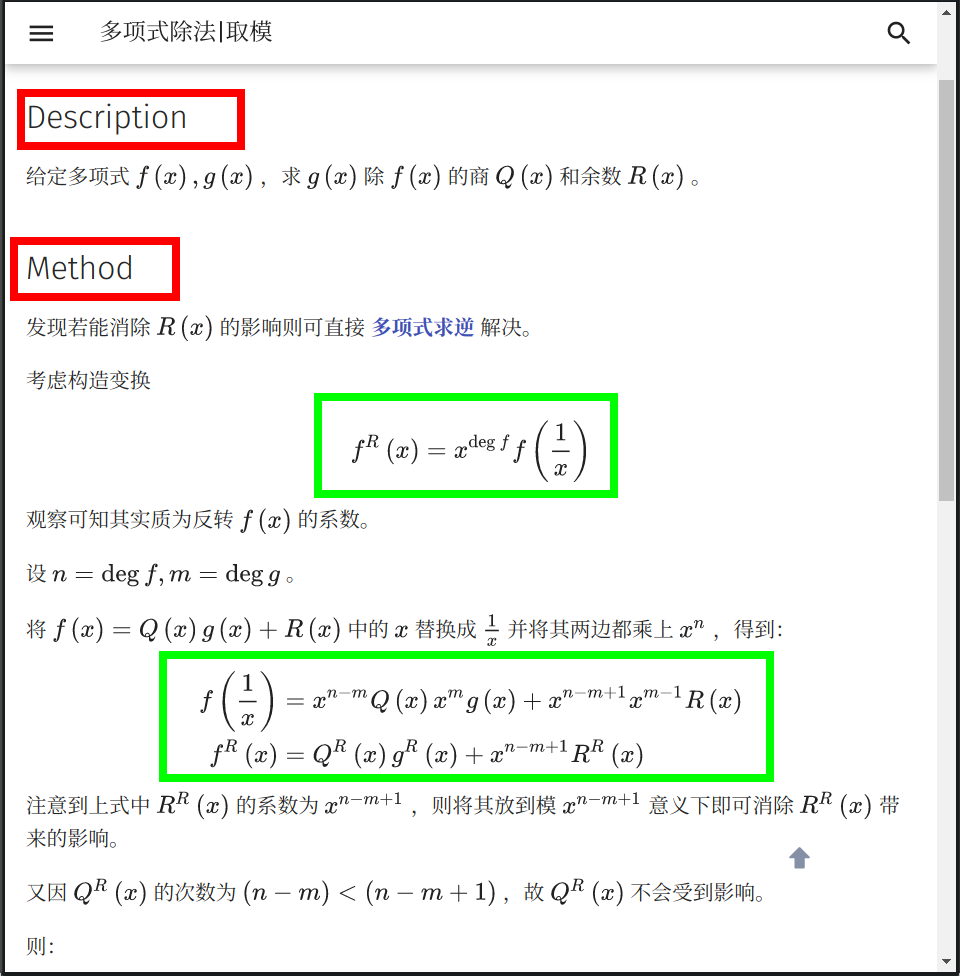
Using displayed format for complex LaTeX formulas can make the page well-structured. However, as OI Wiki is a site primarily in Chinese, we hope most programmatic information (such as titles) uses Chinese as much as possible (except for English proper nouns).
Example 2
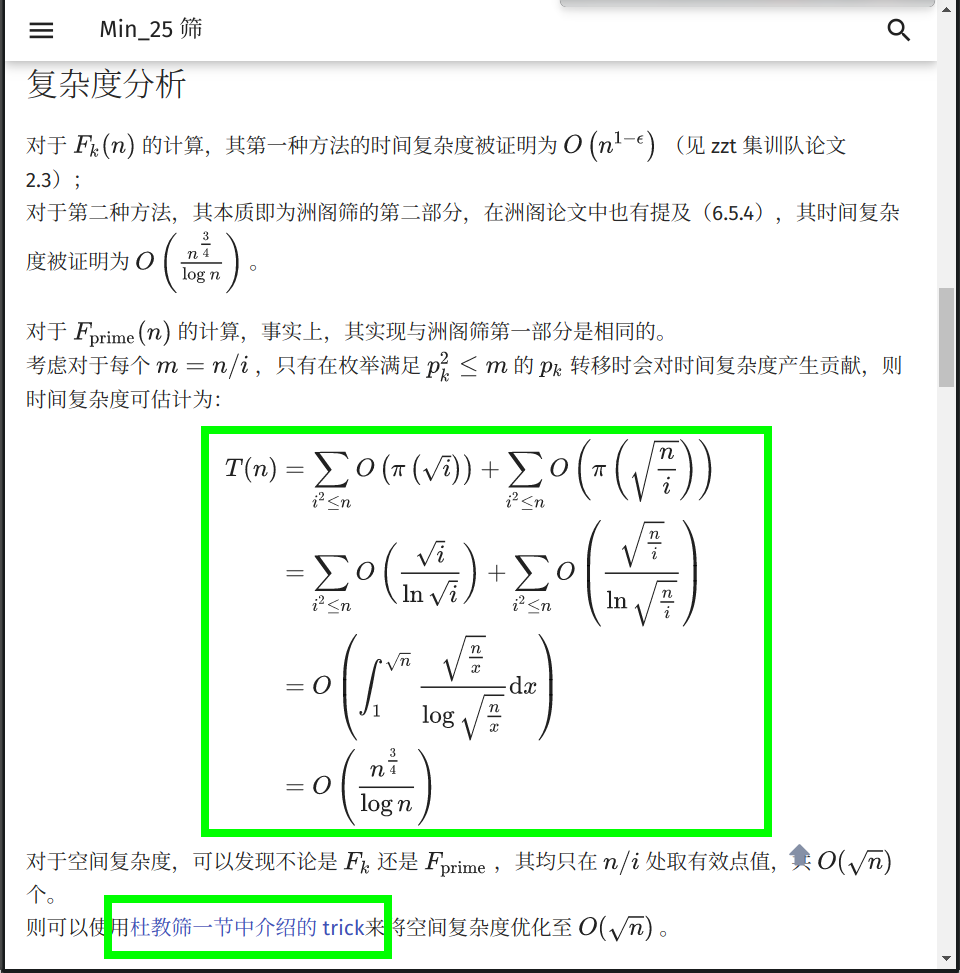
For more complex LaTeX formulas, pay attention to the alignment of equal signs, and you can appropriately reference Wiki page links to improve the content.
Example 3
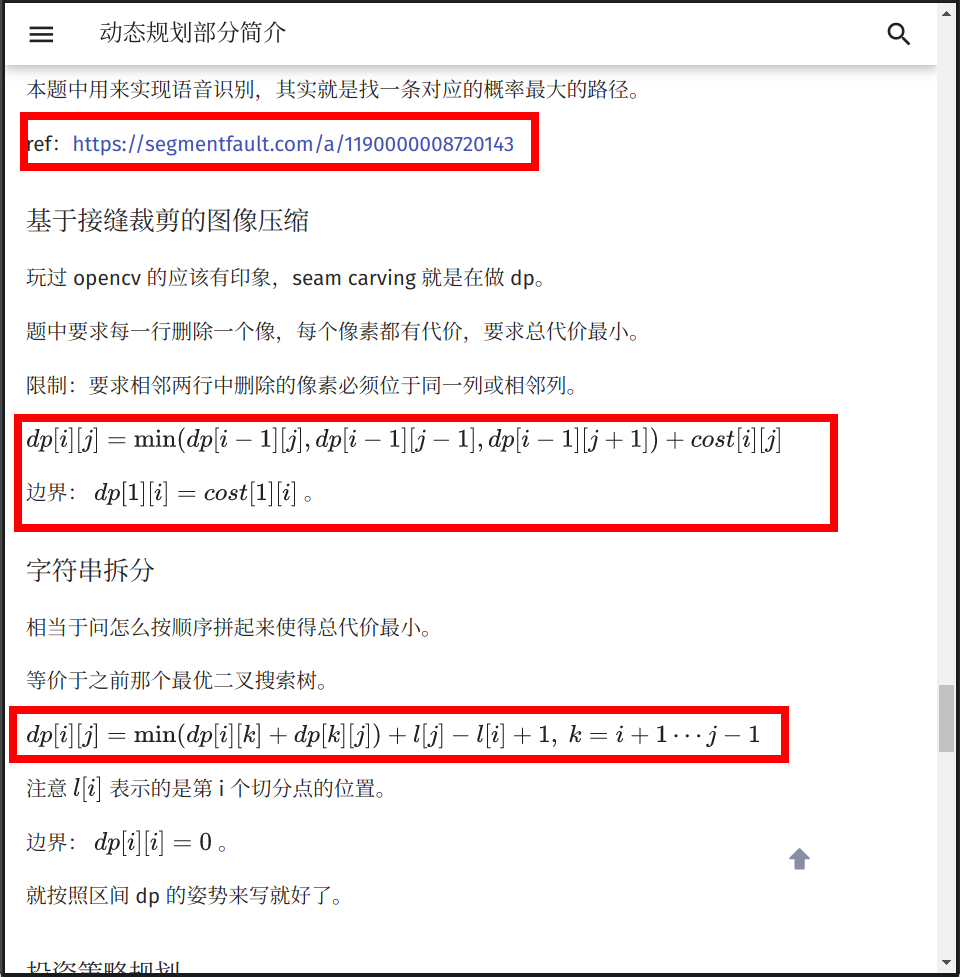
Generally, we recommend listing referenced materials in the ## References and Notes section at the end of the article and adding footnotes after the original sentence, rather than directly providing links. Also, avoid using LaTeX formulas to express code; the two square brackets in the image above are non-compliant. We recommend using dp(i,j) or dp_{i,j}.
Example 4
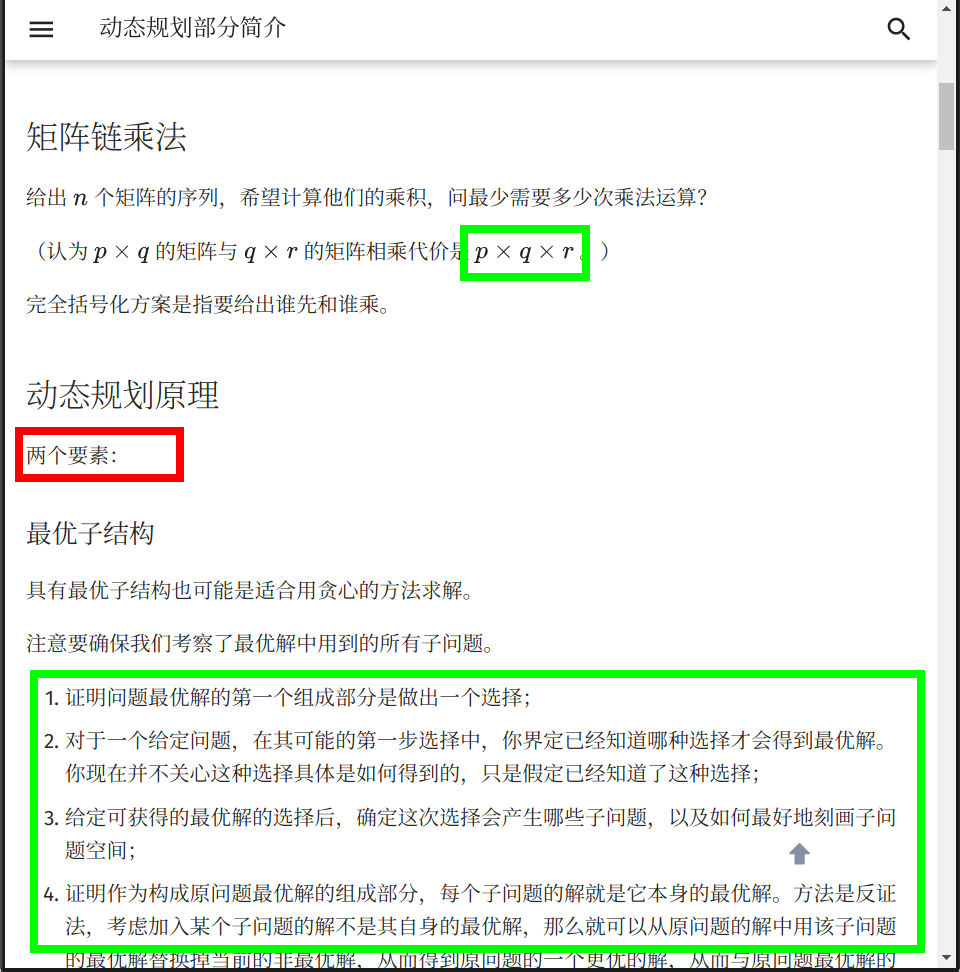
Note that when describing multiplication, we generally use \times or \cdot; in special cases (like convolution), * can be used (can also be written as \ast). Titles are concise phrases, but we don't want the main text to be pieced together from phrases. In the image above, "two elements" is suggested to be changed to "The principle of dynamic programming has the following two elements" to maintain coherence. A good point is that appropriately using ordered lists can express content more systematically. Reminder again: when using lists, if each item is a sentence, a punctuation mark needs to be added at the end. Ordered lists usually add semicolons, with a period at the end of the last item; unordered lists uniformly add periods.
Example 5
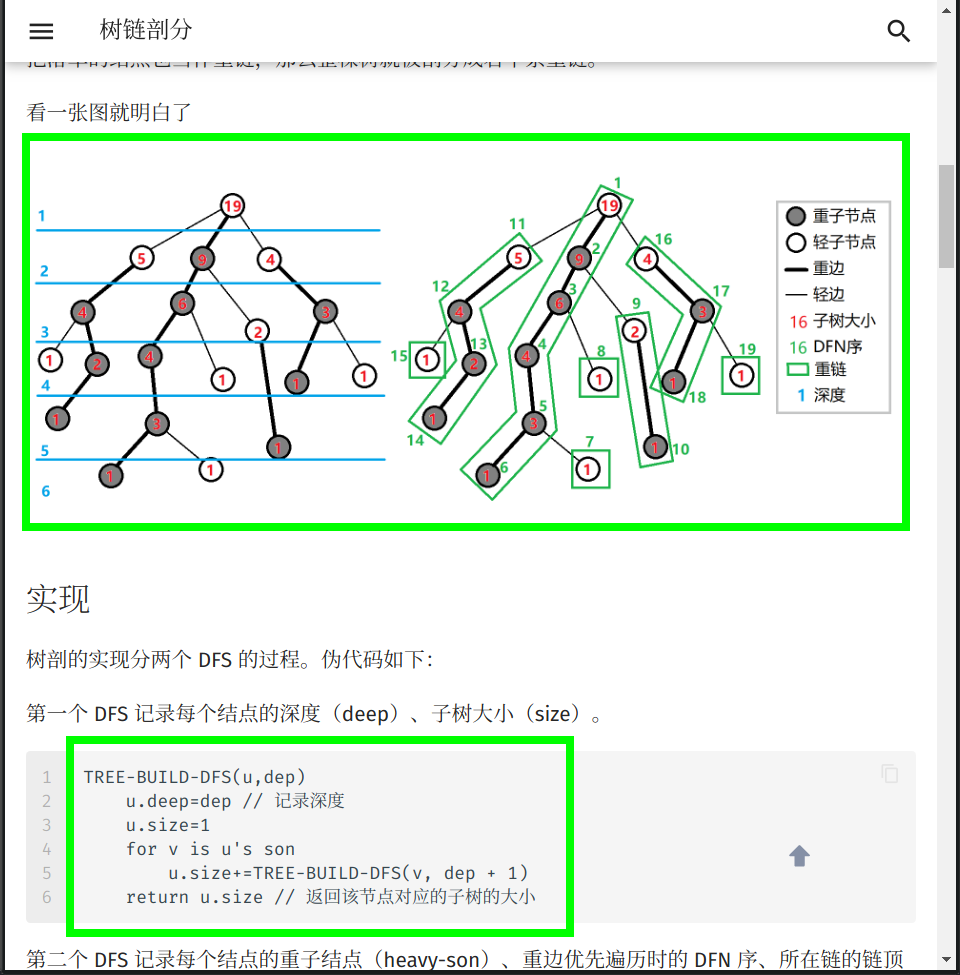
Appropriately referencing images can enhance article readability. Using pseudocode to express the algorithm process can describe the algorithm concisely and conveniently, making it easier to understand than directly pasting template code.
Example 6
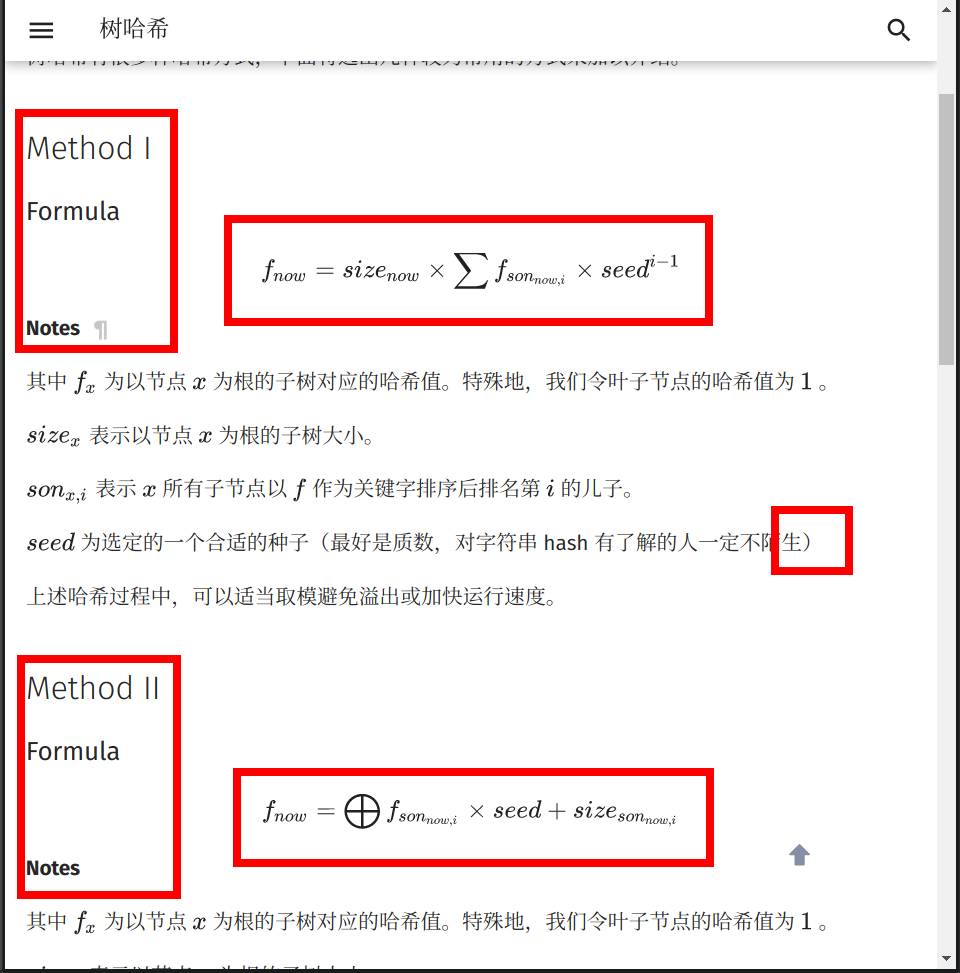
Same issue, the title uses English. Also, there is no period after using parentheses. Additionally, the displayed formula in the image above, although not using parentheses, has too many nested subscripts, making the font of the deepest subscript very small, and the whole formula not aesthetically pleasing. It is recommended to change son_{now,i} to son(now,i), or replace f_{now} with f(now). We hope to control subscript nesting within two layers as much as possible (when multiple superscript nestings are needed, it is recommended to use Knuth arrows, e.g., use \(2 \uparrow (2 \uparrow (2 \uparrow (2 \uparrow \cdots)))\) instead of \(2^{2^{2^{2^{\cdots}}}}\), "The Seven Minutes of God Creating Problems").
Example 7
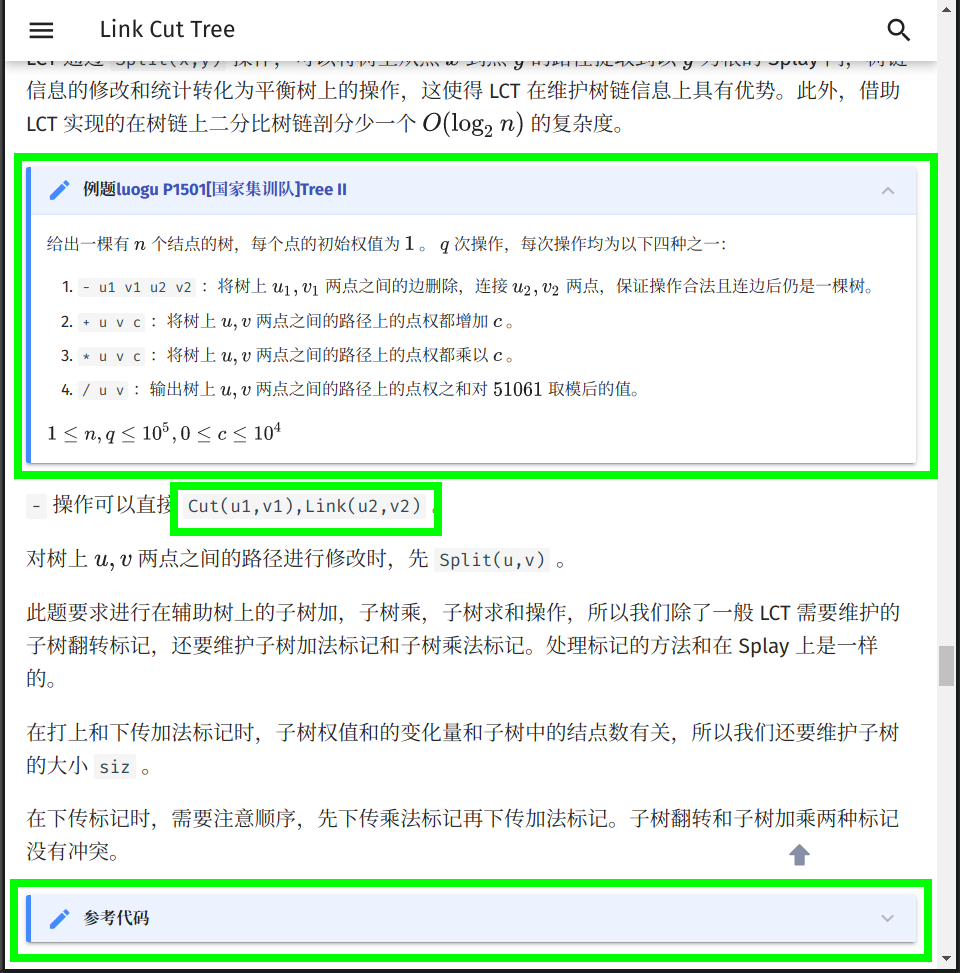
Use MkDocs extension syntax to separate example problem statements from algorithm descriptions. Collapsing code can make the article more compact. (After all, most people reading the Wiki want to understand the ideas; besides template code that needs reading, exercise code can mostly be collapsed.) When describing function operations, using inline code and LaTeX formulas are both good choices.
Example 8
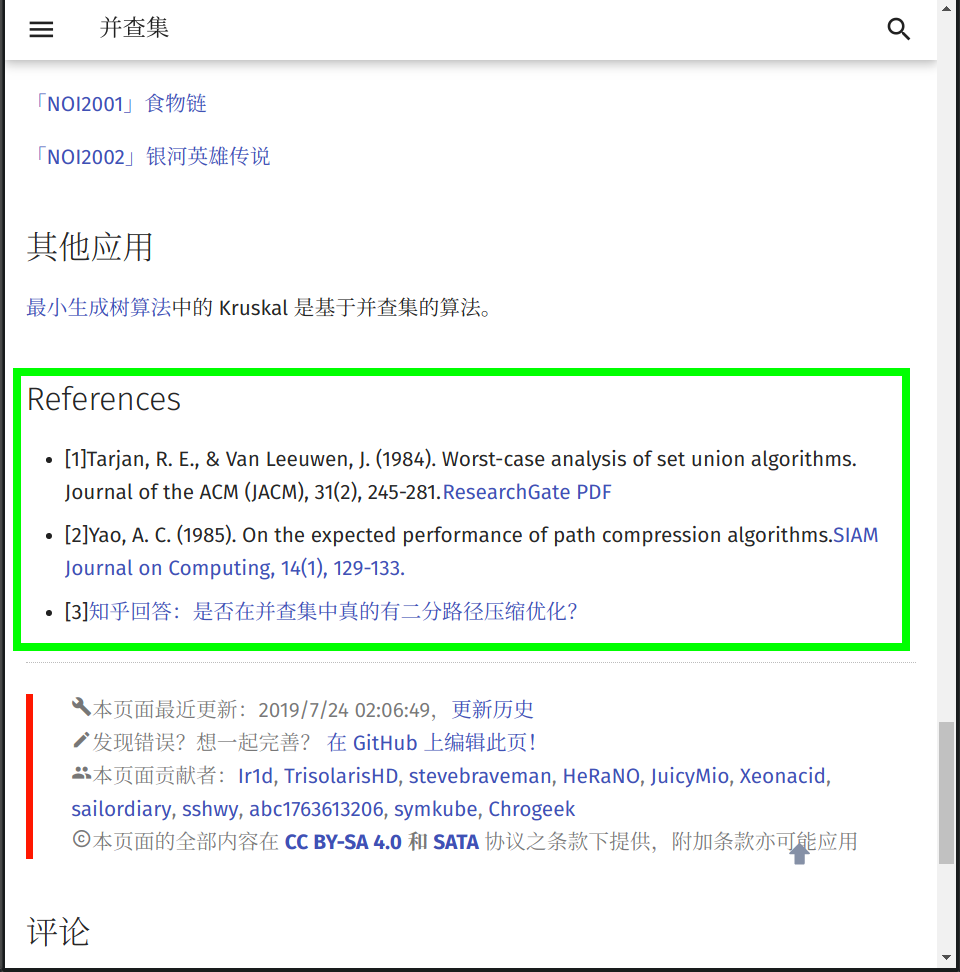
Listing references at the end of the article can make the page content more rigorous and credible.
External Links
- Punctuation Usage (GB/T 15834—2011)
- Wikipedia: Manual of Style/Punctuation
- Chinese Copywriting Guidelines (Simplified Chinese Version)
- Chinese Copywriting Style Guide - PDFE GUIDELINE
- A (Not So) Short Introduction to LaTeX2ε or Learning LaTeX in 106 Minutes
- Editing Standards for Mixing English in Chinese Publications
References and Notes
-
Why doesn't my formula display normally in the table of contents? It seems doubled. ↩
-
Collapsible block: See Collapsible Blocks. Sometimes we also refer to this syntax as "Details syntax" because its functionality is consistent with the HTML
<details>element. ↩↩ -
Tab: See Content tabs. ↩↩
-
CCF Announcement on Resuming NOIP Competition - China Computer Federation ↩
-
Moved to How to Contribute. ↩↩
-
This specification was written into Before Editing and an announcement was released; it was not written into this document. ↩
-
(colon) indicates a summary of the preceding text. ↩
-
Use an English comma between the full English name of a scientific/technical term and its abbreviated form. When an English sentence or segment is inserted within a Chinese sentence for annotation, supplementation, or explanation, that English sentence or segment should be enclosed in Chinese parentheses. ↩
本页面最近更新:,更新历史
发现错误?想一起完善? 在 GitHub 上编辑此页!
本页面贡献者:OI-wiki
本页面的全部内容在 CC BY-SA 4.0 和 SATA 协议之条款下提供,附加条款亦可能应用